
Tracking expenses for tax purposes
PocketSmith doesn't have a specific feature for tracking tax-deductible items, but you can use labels to quickly identify any tax-deductible expenses and calculate totals, as shown in this guide.
Please note that this will not give you a tax total, but it will allow you to see the overall total, from which you may be able to calculate the tax-related portion.
In this article
Add labels to tax-deductible transactions
When reviewing your transactions, you can add a label to the transactions you want to track as tax-deductible. Learn more about labels with this guide: Everything you need to know about using labels.
For example, you could add the label Tax to your tax-deductible transactions.

Viewing and exporting tax-deductible transactions
On the Transactions page, you can view your tax-deductible transactions using a search that includes the label and dates for the transactions you want. You can save this search for easy access in the future, as shown in this guide: Saved Searches.
This will also show the total of these transactions within your search.

Exporting transactions
If you want to export your tax-deductible transactions for use within a spreadsheet or to send to your accountant, click Export in the toolbar and select your desired format. Learn more about exporting transactions in this guide: Exporting your transactions.
Tax-deductible dashboard
You could create a custom dashboard for your tax transactions. As shown in this guide: Customisable Dashboard feature.
You could add these widgets using the saved search you created:
- Earning & Spending
- Transactions column graph
- Recent Transactions
When configuring individual widget settings, the transaction widgets will have the question, 'Which saved search do you want to use?', and update the dropdown to the relevant saved search.
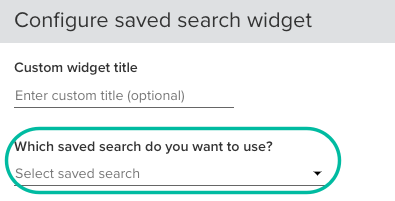
For example, the tax-deductible saved search can be used with the Earning & Spending banner widget. If you slect the option to include the categories table, you'll get a table showing the category breakdown, similar to the Income & Expense report.
