
Getting Help in PocketSmith
You can submit feed issues, get instant answers with AI, read guides and ask the PocketSmith team questions from within PocketSmith.
Steps to get help
-
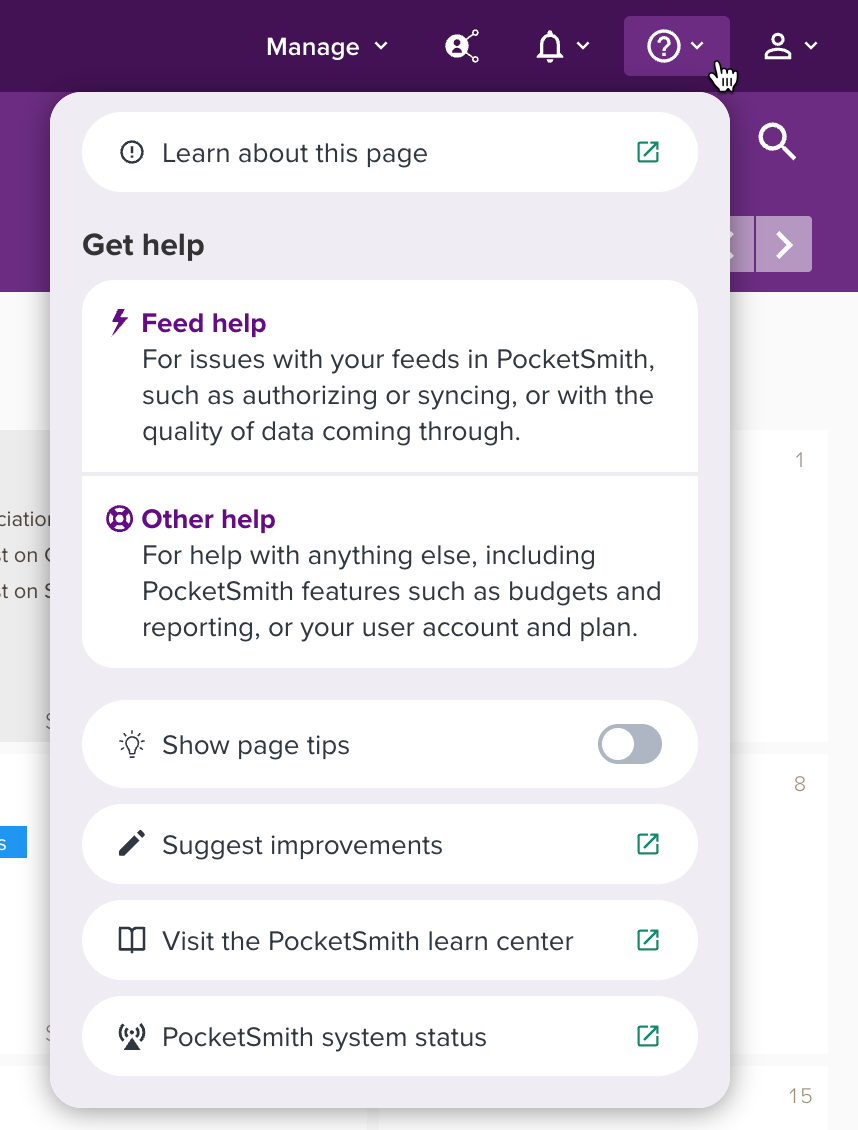
Click the question mark icon in the top-right
-
Choose Feed help if you have a problem with a feed, go to this guide for more details: Getting help for feed issues
Choose Other help if you have questions about anything else to do with PocketSmith and this will open the help overlay
Help overlay
When you click Other help the help overlay will show in the screen's bottom-left and provide some options for getting help.
You can choose:
- AI Answers: You can chat to an AI assistant with questions about PocketSmith, and it will provide instant answers based on information in the PocketSmith Learn Center and website.
- Learn Center- where you can search the PocketSmith Learn Center and read guides to help you with PocketSmith
- Contact our team - where you can ask questions to the PocketSmith team and get a personalised response via email, most likely within a couple of business days
You can close the help overlay by clicking Hide on the top left.
