
Using PocketSmith on your mobile web browser
Learn some tips on using PocketSmith from your mobile web browser when the Android and iOS mobile apps lack something available within the web app.
We are working towards the PocketSmith web app working better on mobile devices, as explained in this blog post: The Future of PocketSmith on Mobile 📱
Mobile dashboard template
You may like to make use of the web app's 'Mobile dashboard' template. When viewed in a browser on your mobile device, this Dashboard will be zoomed perfectly to fit. 🙌
For more information on this, see: Mobile-friendly Dashboard.
This template provides you with a single column of widgets.
Once created, log into the web app on your phone's mobile browser (Chrome, Safari, etc.) and make sure to check the "remember me" checkbox, and then navigate to your newly created Dashboard. Next, add a direct link to the relevant Dashboard on your home screen for easy access.
You can then tap the home screen link, and you'll be shown the Dashboard you've designed!
Tips for viewing all toolbar options in a mobile browser
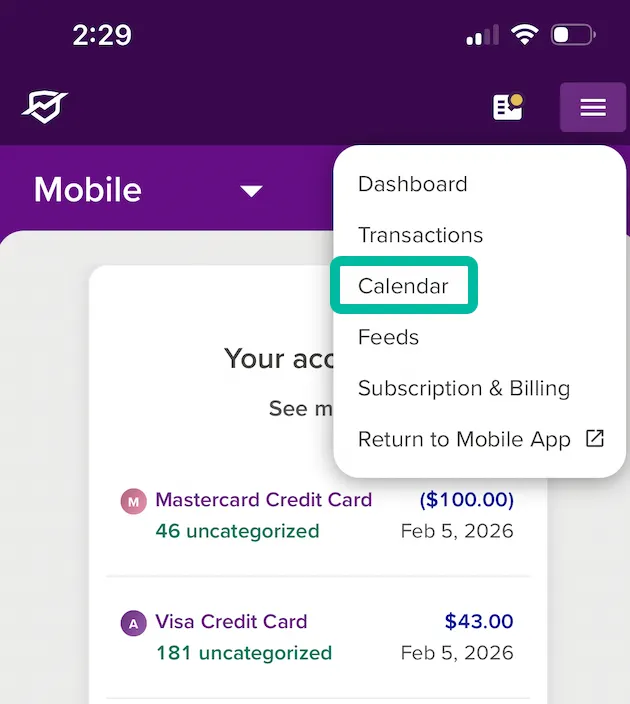
- Sign in to the web app on your mobile browser
- Tap the menu button at the top right
-
Select 'Calendar'
-
You'll then be able to see all of the toolbar options that you are used to, e.g. Reports ✨

Tip
It helps to pop your phone into landscape view and zoom fully out.